TetherReach / Knowledge / Buyer guide
LinkedIn outreach software: what TetherReach includes today
TL;DR: LinkedIn outreach software helps you prepare invitations and follow-up messages, approve a campaign and keep track of what came of it. TetherReach splits that job between a web account and a desktop app on your own computer. It is in private beta: payments are off, prices are proposals, and a full live journey from message to reply still needs independent confirmation.
What does LinkedIn outreach software do in TetherReach?
In TetherReach it prepares LinkedIn invitations and the messages that follow them, lets you review a campaign before it runs and shows the outcome per person. The software has two parts. A web account holds your campaigns, people and results. A desktop app, installed on your own computer, carries out the steps you approved in Google Chrome.
That split decides a few practical things. The computer and the app must stay on while a campaign is running. Each LinkedIn account needs its own installation with its own pairing code. You type your LinkedIn password only on LinkedIn's own sign-in page, and the browser profile stays on your machine. Read more on the product page.
The app is built for Apple Silicon and Intel Macs on macOS 13 or later and for 64-bit Windows 10 and 11. Intel Macs and real Windows 10 or 11 desktops have not had their own acceptance checks yet.
Which campaign steps are included?
The first test offering covers four kinds of steps: a connection invitation, a message once someone accepts, a wait, and a check for a reply. You build the list yourself by importing a CSV file with a linkedin_url column. Name, company, position and language are optional columns you can use in the text.
Filters, tags and stages help you sort the records. Broader AI and CRM actions are outside the offering and stay experimental. An older campaign may still show advanced actions, but being able to read their settings does not make them supported.
A new campaign does nothing until someone approves it for real outreach in the dashboard. After that, the app must be allowed to run approved campaigns and you press Start campaigns. Read your invitation and messages before you add anyone; the LinkedIn invitation guide helps with that first note. Watch your first live campaign yourself: a run that passes in tests is no proof of a real send.
Try it yourself, no payment details
Create an account, import a small list and review your first campaign as a draft. Nothing is sent before you have checked it. Mac or Windows + Chrome; you install the desktop app yourself in fifteen minutes.
Who on a team can change what?
TetherReach has four workspace roles. The owner looks after the workspace settings and the billing. Adding and removing teammates is open to owners and administrators, and both can settle a send whose result is unclear. Members work on campaigns and profiles. Viewers can read records but cannot change them or start work.
An unclear result matters most here. When the app cannot tell whether an action reached LinkedIn, that task is held and offers no plain retry. An owner or administrator compares the approved text with the real conversation, notes what they saw, and marks it sent or not sent. The help pages describe that review step by step.
If a page tells you your role cannot make a change, ask the owner. Sharing the owner's login is never the fix.
What does TetherReach cost?
There is no price to pay yet, because payments are switched off and the prices on the table are still proposals. Mollie is the planned payment provider; according to Mollie's pricing page it handles methods such as iDEAL, PayPal and Klarna.
The planned launch offer is one monthly subscription in euros at full price. Annual billing, discounts, proration and separate credit packs are not part of it. In tests in Mollie's test mode, payments covered a first iDEAL payment, a mandate, a plan change, a subscription and a cancellation. Beyond what passed in tests, automatic callbacks from the provider, recurring payments, refunds and chargebacks are still unproven, and live checkout stays closed until they pass.
Once billing is live, the account console is designed to show subscription status, payment receipts and cancellation. Those receipts are not tax invoices. Changing plans or restarting a canceled subscription goes through support.
How much of the software has been tested?
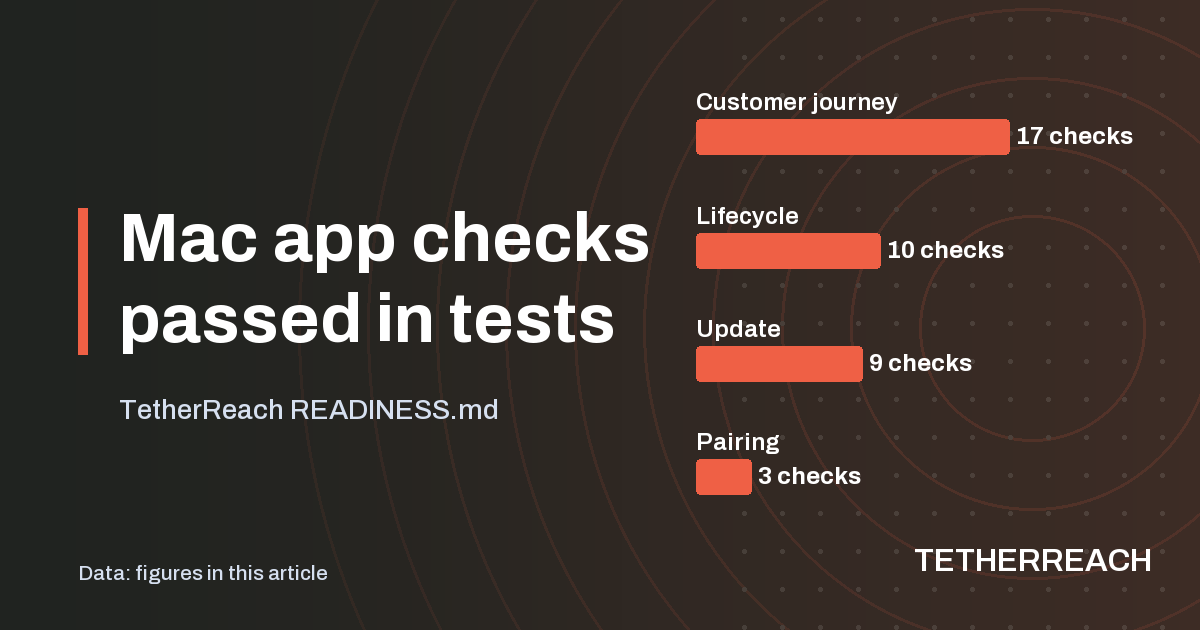
The installed Mac app passed every check in its four test suites, run against isolated local LinkedIn test pages. Those runs show the setup and update paths work in a controlled test. They do not show how a customer's live LinkedIn session behaves.
| Mac app test suite | Checks passed | Checks run |
|---|---|---|
| Customer journey | 17 | 17 |
| Lifecycle | 10 | 10 |
| Update | 9 | 9 |
| Pairing | 3 | 3 |
What is still open before launch?
A broader repeat of the automated suite ran 547 cases: 546 passed, none failed and one native package check was skipped, which passed on its own afterwards. A synthetic load test put 10 workspaces with 1,000 profiles each under 20 concurrent clients. It handled 17,826 requests in 60.1 seconds with no errors and no data crossing between workspaces. That bounded test is not a promise about production capacity.
Real outreach evidence is thinner. The audit saw four successful live invitation receipts. A complete run from invitation to acceptance, message and reply has passed in tests only and has not yet been independently confirmed on LinkedIn. A clean install on a Mac that never ran the software has not been rehearsed. The packages carry no paid signature, so macOS and Windows warn once when you first open the app. No tool can keep LinkedIn from restricting an account, and TetherReach makes no such promise. If you want to try it in this state, ask through the contact page.
Frequently asked questions
Does LinkedIn allow outreach software?
LinkedIn's help page on automated activity says it does not allow third-party software or browser extensions that automate activity on its site, and calls their use a breach of its User Agreement. Accounts can be restricted for it. That risk applies to every outreach tool, TetherReach included, so weigh it for your own account.
Can I run two LinkedIn accounts from one installation?
No. Every LinkedIn account is tied to its own installation of the desktop app, paired with a separate code from the dashboard. A team with two senders installs the app twice. To reconnect an account you already use, open the same installed app instead of creating a new pairing or wiping its private data.
Where are my campaigns and LinkedIn login stored?
Campaigns and their results are kept on the TetherReach server. The desktop app keeps the LinkedIn browser profile and its recovery evidence on your own computer. Your password goes only into LinkedIn's own sign-in page. For export or deletion, stop running work first and then contact support, so any action in progress can be checked.
Sources
- LinkedIn Help: Automated activity on LinkedIn · www.linkedin.com/help/linkedin/answer/a1340567 · checked 22 October 2026
- Mollie: pricing and payment methods · www.mollie.com/pricing · checked 22 October 2026
Further reading
Want more of this in your Google results? Add TetherReach as a preferred source.