TetherReach / Knowledge / Buyer guide
Sales automation tool for LinkedIn: what TetherReach does
TL;DR: A sales automation tool for LinkedIn should send the invitations and follow-up messages your team approved, and leave the rest of the pipeline to your CRM. TetherReach does that one job. You import a list, read the texts, approve a paused campaign, and a desktop app on your own computer carries out the steps. It is in private beta with payments switched off.
What does a sales automation tool do on LinkedIn?
On LinkedIn, a sales automation tool handles the repetitive part of outreach: sending connection requests, writing to people who accept and checking who answered. Most tools sold under that name cover other parts of selling. Zapier's guide to the best sales tools names 8 products, from CRMs like HubSpot and Pipedrive to call analysis in Gong and lead enrichment in Clay. In that guide, LinkedIn shows up as a data source for Clay. None of the 8 is described as the tool that sends your invitations.
TetherReach covers that gap and stays inside it. A campaign has four supported step types: an invitation, a message once someone accepts, a wait and a reply check. You decide who is on the list and what each message says. The product page walks through the route from list to conversation.
Can TetherReach replace a CRM?
No. TetherReach handles the outreach part. Campaigns and their results are stored on its server, and filters, tags and stages sort the people in your list. Deals and forecasts stay in the CRM you already use.
Your list arrives as a CSV under My network. Each row needs a linkedin_url column. Name, company, position and language are optional columns you can use in your texts. Broader AI and CRM actions are still experimental and are left out of the first test offering. Older campaigns may show advanced actions, but being able to read their settings does not make them supported.
Try it yourself, no payment details
Create an account, import a small list and review your first campaign as a draft. Nothing is sent before you have checked it. Mac or Windows + Chrome; you install the desktop app yourself in fifteen minutes.
How does a campaign get from your list to LinkedIn?
The work runs on your own computer. TetherReach has no cloud execution and no Linux build. The desktop app is built for 64-bit Windows 10 and 11 and for Macs running macOS 13 or newer, on Apple Silicon as well as Intel chips. It needs Google Chrome.
After you download and install the app, you create a pairing code in the dashboard under Desktop verbinden and enter it in the app with the portal address. Then you sign in to LinkedIn yourself through the app. Your password only goes into LinkedIn's own sign-in page. One installation serves one LinkedIn account, so a second sender needs a second installation and code.
Nothing runs until you approve a paused campaign for real outreach, let the app run approved campaigns and press Start campaigns. While it runs, your computer has to stay on with the app open. Read the invitation and message text before you add people; the LinkedIn invitation guide helps with that first note.
Is a sales automation tool allowed on LinkedIn?
LinkedIn says no. According to LinkedIn Help, the site does not allow third-party software or browser extensions that scrape or automate activity, and it can restrict an account for it. TetherReach does not promise protection from those restrictions, and LinkedIn may change its pages.
What TetherReach adds is a clear rule for unclear results. Progress stops when you pause a campaign or close the app, and also when your LinkedIn session has expired or LinkedIn shows a warning. If the app cannot tell whether an action reached LinkedIn, the task is held and gets no plain retry button. An owner or administrator compares the approved text with the real conversation, records what they saw and chooses sent or not sent. The help pages explain that review.
How far has TetherReach been tested?
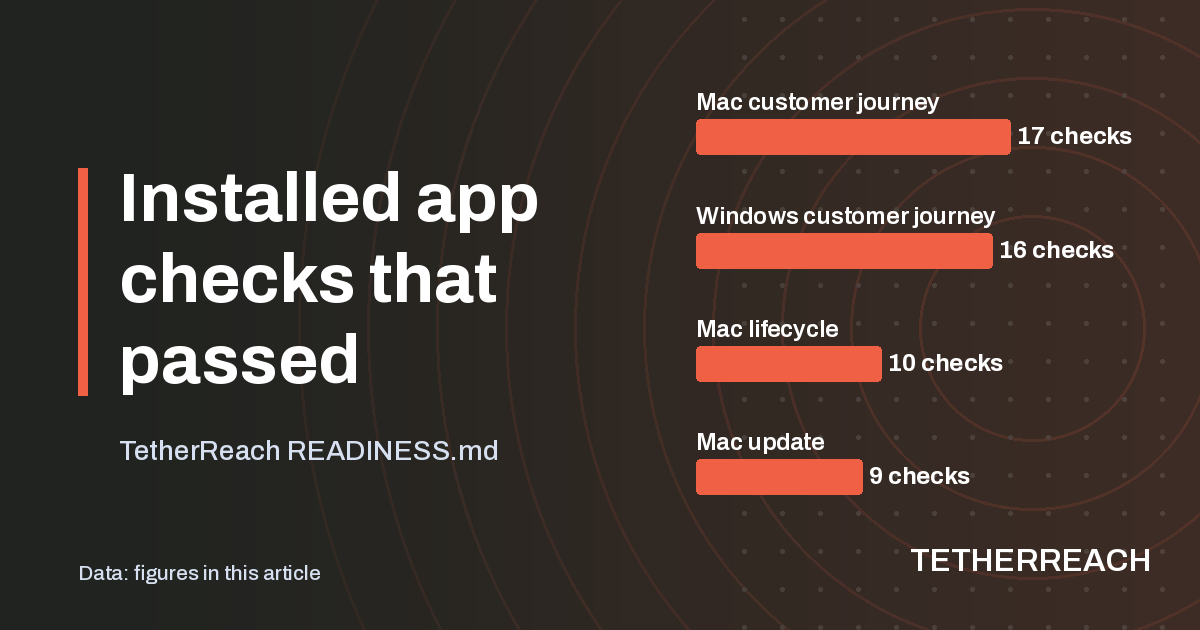
The installed app passed every check in its test sets, run against isolated local LinkedIn test pages. The Windows checks ran on GitHub's hosted Windows runner. These tests show that setup and updates work in a controlled environment. They say nothing yet about a live LinkedIn session of a customer.
A load rehearsal with 10 workspaces of 1,000 profiles each sent 17,826 requests in about 60 seconds without errors or cross-workspace leaks. That is a bounded local test, not a capacity promise. A real Windows 10 or 11 desktop, an Intel Mac in use and a fresh customer install still need their own acceptance. In the tests so far, the full live journey from message to reply has no independent confirmation yet. Payments are off and prices are still proposals.
| Installed app test set | Platform | Checks passed |
|---|---|---|
| Customer journey | Mac | 17 of 17 |
| Customer journey | Windows runner | 16 of 16 |
| Lifecycle | Mac | 10 of 10 |
| Update | Mac | 9 of 9 |
| Pairing | Mac and Windows runner | 3 of 3 each |
Frequently asked questions
Does TetherReach work with my CRM?
TetherReach's documentation describes no CRM connection today. Campaigns and results are stored on TetherReach's server, and filters, tags and stages keep the people in a campaign organised. Broader CRM and AI actions are experimental and outside the first test offering, so keep your deals and forecasts in the CRM you already use and run LinkedIn steps from the dashboard.
What does TetherReach cost?
Nothing yet. Payments are switched off and prices are proposals until they are approved. Mollie is the planned payment provider, and the planned launch offer is a full-price monthly subscription in euros. Annual billing, discounts, proration and separate credit packs are not part of that offer. You can start with the free trial in the meantime.
Does a campaign keep running when my laptop is closed?
No. The LinkedIn steps only happen while your computer is on and the desktop app is running, because TetherReach has no cloud execution. If you close the app, the campaign stops making progress until you open it again. To reconnect, open the app you already installed, which keeps its account, and skip making a fresh pairing.
Sources
- Zapier: The best sales tools · zapier.com/blog/best-sales-tools/ · checked 29 October 2026
- LinkedIn Help: Automated activity on LinkedIn · www.linkedin.com/help/linkedin/answer/a1340567 · checked 29 October 2026
Further reading
Want more of this in your Google results? Add TetherReach as a preferred source.