What does the software do in your campaign?
TetherReach is LinkedIn campaign software for preparing work in your web account and running approved steps through a desktop app. Review the list, filled-in messages and account settings before allowing a campaign to send.
From profile link to reviewed message
Start by importing LinkedIn contacts from CSV. Each person needs a LinkedIn profile link. Names, companies and job titles help make the message relevant. TetherReach skips duplicate profiles and people on your exclusion list. Check that the remaining people fit your audience yourself.
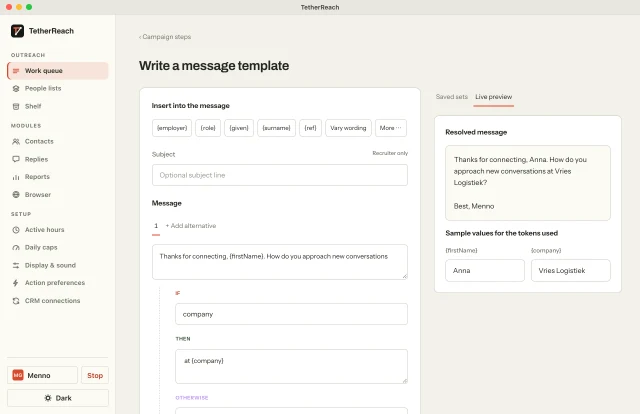
Use personalised LinkedIn messages with variables and IF/ELSE for missing fields. Read the result for each person. A long company name or a missing first name should still produce a readable message. Save the campaign and check its content before approving it.
What happens on your computer?
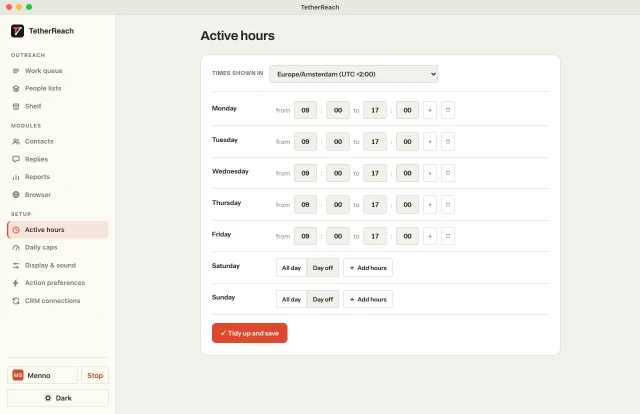
Sign in to LinkedIn yourself in a separate Chrome profile. Keep your computer and desktop app on while a campaign runs. Set LinkedIn daily limits and working hours per account. Those settings determine when an approved step can run. They cannot guarantee protection from LinkedIn restrictions.
When the app detects a reply, it stops the pending follow-ups for that person. You take over the conversation. See LinkedIn reply detection for that workflow. You can also pause or stop a campaign yourself.
Who keeps track of the work?
Invite team members with their own logins and choose their access per LinkedIn account. TetherReach team roles determine who manages campaigns, exports and billing. Owners and admins can download contacts, messages and results as CSV. Check which columns your CRM can import.
Follow the first TetherReach campaign walkthrough from import to approval, or compare TetherReach pricing. For an overview of the LinkedIn automation tool, visit the homepage.
HOW IT WORKS
From list to conversation in four steps.
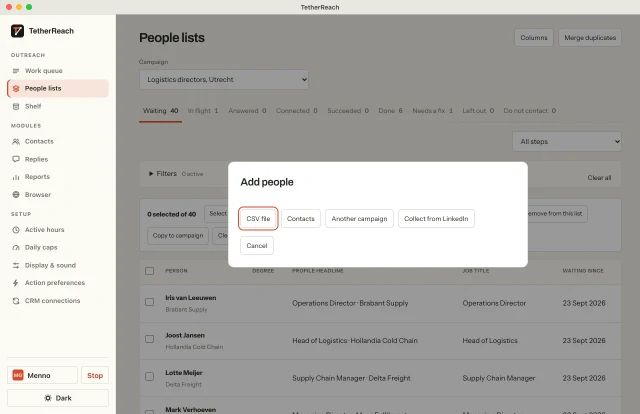
Import your list
Pick a CSV, your contacts or another campaign. Duplicates and your exclusion list drop out first.
Write once
Variables and IF/ELSE fill every message. No empty gaps.
Set your pace
Daily and weekly limits, working hours and random gaps. Never faster.
Have the conversation
Anna replies. Her follow-ups stop. You take it from there.
- Thursday
-
Menno Gottmer· 9:40 AM
Hi Anna, I came across your work at Vries Logistiek. Happy to connect?
- Monday
-
Menno Gottmer· 10:12 AM
Thanks for connecting, Anna. How do you approach new conversations at Vries Logistiek?
-
Anna de Vries· 2:48 PM
Yes, happy to. Let’s have a call next week.
FEATURES
Everything for calm, personal outreach.
Fast import
CSV or pasted rows. Every row checked before it goes in.
Personal every time
Variables, IF/ELSE and greeting variants.
Your pace
Limits, working hours and gaps per LinkedIn account.
Stops on a reply
A real reply stops every next step for that person.
You approve
A campaign starts only when you approve it. Pause any time.
On your own computer
The desktop app uses your own Chrome and your own login.
Export everything
People and messages as CSV, whenever you like.
Work as a team
Roles for owner, admin, member and viewer.
WHAT YOU NEED
Before you start.
- Computer
- Mac (macOS 13 or later) or Windows 10/11, with Google Chrome.
- The desktop app
- It carries out the steps. Keep it open while a campaign runs.
- Your LinkedIn login
- You sign in yourself. We never ask for your password.
- One account per install
- Each installation runs one LinkedIn account.
A Gottmer Agency brand. Three products from one maker, each with its own job.