TetherReach / Knowledge / Personalisation
How variables and missing fields work in TetherReach messages
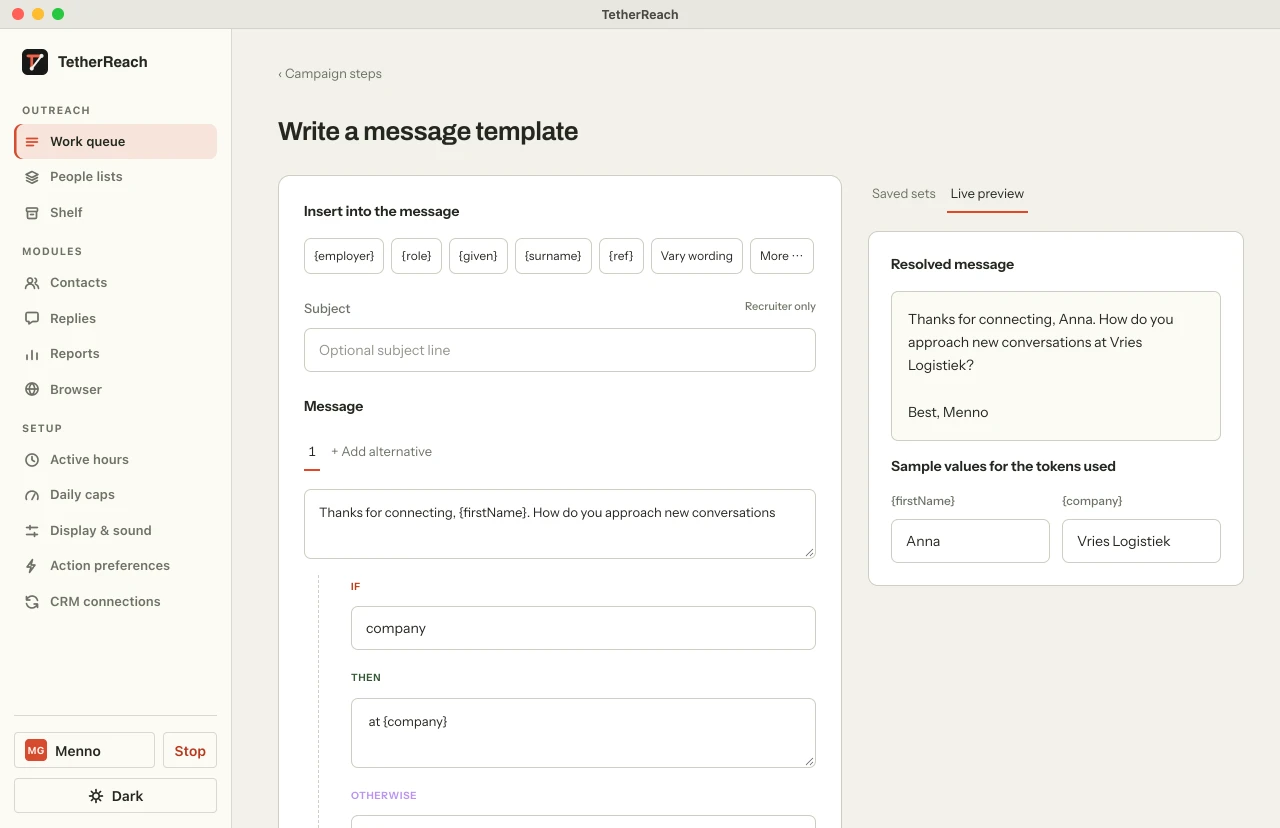
TL;DR: Put a field such as {firstName} or {company} in your template to use the value from your imported contact. Use {IF} and {ELSE} to handle empty fields. Review the resolved message before approving your campaign.
1. Which variables can you use?
A template is plain text with curly braces. The template engine knows these standard variables, filled from your CSV import:
{firstName}and{lastName}, derived from full_name if you do not import them separately.{fullName},{company},{position},{headline},{location}.- Every custom CSV column with the cs_ prefix, for example
{cs_branche}or{cs_city}.
A variable the engine does not know stays literally in place and is flagged on save as “unknown variable”. That is deliberate: better an error up front than an odd text at a real person.
See how imported fields fit into your first campaign.
| Variable | Source | When the field is empty |
|---|---|---|
{firstName} | first_name, otherwise the first word of full_name | Empty text |
{lastName} | last_name, otherwise the rest of full_name | Empty text |
{company} {position} {headline} {location} | CSV column of the same name | Empty text |
| {cs_…} | Custom column with the cs_ prefix | Empty text |
{something_unknown} | None | Stays literally in place and is refused on save |
2. What happens when a field is empty?
A known variable without a value is replaced by nothing. “I saw your work at {company}.” therefore becomes “I saw your work at .” when the company is missing. You never see undefined, null or the variable's name; but a gap in a sentence is not a good message either.
That is why the IF construction exists: {IF company}at {company}{ELSE}in {cs_branche}{ENDIF}. The engine checks whether the field is filled (spaces do not count) and picks one text or the other. You can nest, and {ELSE} may be left out. An imbalance between {IF} and {ENDIF} is flagged before you can save.
The product overview explains where message review fits in the workflow.
The preview (all variants) renders the template for a fictional person with a long name and a long company, counts the characters of the longest variant and compares it with the step's limit: 200 characters for an invitation note, 8,000 for a message. A template that becomes too long in its longest variant cannot be saved.
Try it yourself, no payment details
Create an account, import a small list and review your first campaign as a draft. Nothing is sent before you have checked it. Mac or Windows + Chrome; you install the desktop app yourself in fifteen minutes.
3. Variants with {Hi|Hello}
Between braces with a vertical bar you write alternatives: {Hi|Hello|Hey}. One variant is chosen per person, and that choice is fixed: the same person gets the same greeting in every step and on every recalculation. The choice is derived from the person's LinkedIn URL, so the variants spread evenly across your whole list. That is not random, and so not a way to hide anything; it only prevents a hundred people getting literally the same sentence.
Variants can be combined with IF/ELSE. The preview then shows every combination.
If a field still does not resolve as expected, get help before approving the campaign.
4. A complete example, worked through
Take this template for an invitation note:
{Hi|Hello} {firstName}, I came across your work {IF company}at {company}{ELSE}in {cs_branche}{ENDIF}. Happy to connect?
And two people from an import: Anna de Vries (company: Vries Logistiek, cs_branche: logistics) and Bram Jansen (company empty, cs_branche: recruitment). The engine then produces exactly this:
| Person | Rendered note | Characters |
|---|---|---|
| Anna de Vries | Hi Anna, I came across your work at Vries Logistiek. Happy to connect? | 70 of 200 |
| Bram Jansen | Hi Bram, I came across your work in recruitment. Happy to connect? | 66 of 200 |
Hi Bram, I came across your work in recruitment. Happy to connect?
5. Two languages per step
Every message step has a Dutch and an optional English template. If the person has language: en in the import and the English template is filled in, that person gets the English template. In every other case the Dutch one. So you do not need a separate campaign per language, but you do have to review both templates; the preview shows them both.
6. What variables do not do
Variables fetch nothing from LinkedIn. Everything that ends up in a message was in your CSV. There is no automatic “I saw your post about …”, no generated text and no lookup that links companies to people. Anyone who wants to personalise beyond what the list allows puts it in a custom column and checks it themselves. That is slower than what some tools promise, and exactly why the message is right.
Frequently asked questions
Can “Hi undefined” happen?
No. A known variable without a value becomes empty text; an unknown variable is refused on save. What can happen: a sentence with a gap, if you do not use {IF} on a field that may be empty.
Is the {Hi|Hello} choice random?
No, it is fixed per person and spread evenly across your list, derived from the LinkedIn URL. The same person always gets the same variant.
How long may an invitation note be?
200 characters, measured on the longest variant the template can produce. A message after acceptance may be 8,000 characters.
Can I use a variable in a condition without putting it in the text?
Yes. {IF cs_city}Greetings from {cs_city}{ENDIF} works, and {IF company}…{ENDIF} without {company} in the text does too.
Sources
- TetherReach, template engine and character limits (lib/template.mjs in the source) · checked 12 September 2026
- LinkedIn Help, note with an invitation (200-character limit) · www.linkedin.com/help/linkedin/answer/a563153 · checked 12 September 2026
Further reading
Want more of this in your Google results? Add TetherReach as a preferred source.